01
Choose what goes.
Open the extension on ChatGPT. Filter loaded chats by title, then select the ones you no longer need.
The conversation you’re viewing stays protected.Pick the conversations you no longer need. Delete them in a batch—or archive them for later. Less menu clicking. More room to think.
Free: 1 cleanup a day, up to 10 chats. No card needed.
5 chats loaded · Current chat protected
Want older chats? Load more in the sidebar first.
Select the loaded chats you no longer need.
No “delete everything” surprise. You choose the chats, review the batch, and stay in control.
Open the extension on ChatGPT. Filter loaded chats by title, then select the ones you no longer need.
The conversation you’re viewing stays protected.Review the exact chat titles in your selection. Type DELETE to confirm a deletion—or archive to keep the contents.
Nothing is deleted without your confirmation.Keep ChatGPT in the foreground. The extension handles one chat at a time, checks the result, then moves to the next.
If a page control can’t be verified, it stops.A separate selector keeps your chat list easy to review. No tiny checkboxes scattered through the page. No guessing what’s selected.
Search titles, select a batch, and see the current chat excluded automatically.
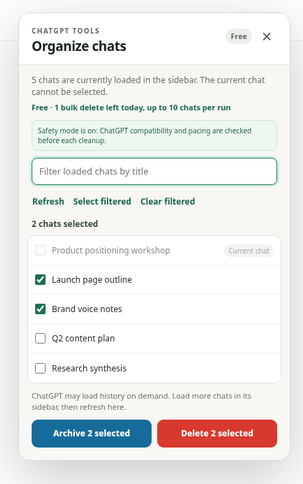
Clear temporary questions, old drafts, and conversations you no longer need—in a single confirmed batch.
Bulk archive moves chats out of the sidebar without deleting their contents. A calmer list, with your work preserved.
Out of sight.
Not gone.
One chat at a time. Built-in pauses. Current-chat protection. If ChatGPT’s controls can’t be verified, the run stops instead of guessing.
ChatGPT can change its interface. Compatibility checks reduce risk; they don’t replace future extension updates.
The same careful workflow, whichever plan you choose.
A small reset, every day.
For a sidebar that needs regular care.
Pay once. Keep your cleanup tool.
Prices in USD. Secure checkout by Stripe. Manage subscriptions from your account.
Cleanup happens in your browser. Account and billing checks happen on our server. Here’s the boundary.
Read the privacy policyCard details are handled by Stripe—not by the extension.